

iShot Pro is an excellent Mac、Fully functional area screenshots、Window screenshot、Multi-window screenshot、long screenshot、Screenshot with shell、Time-lapse screenshot、Quick annotation、stickers、Toriiro、screen recording、recording、OCR、Screenshot translation tool。
Function
one、screenshot
- 区域截图、Window screenshot
支持框选截图、Smart recognition window screenshot,Customize screenshot shortcut keys。 - Multi-window screenshot
按下截图快捷键,Add Shift,Click multiple windows,Take multi-window screenshots。 - 延时全屏截图
延时全屏截图,Support countdown sound playback,Used to capture windows that are difficult to select。 - 截图上一次截图区域
Use shortcut keys,Quickly take a screenshot of the last selected screenshot area。 - 截图光标下窗口
Use shortcut keys,Directly screenshot the window under the current mouse,No need to activate this window。 - Screenshot guide rounded corners、Shadow effect supports automatic rounding of corners in screenshots、Screenshot shadow can be colored、Size adjustment,Make your screenshots more elegant。
- 截图快速打开
完成截图后可通过双击Option,Open pictures using a custom app,make your screenshot、Edit seamlessly。 The default is to use "Preview" to open the image,You can also set it to open using other apps;in addition,When selecting Finder,Is to open the Finder location where the screenshot was saved。 - 保存/存储
- 支持保存到剪切板、保存到本地
- 支持保存到剪切板的同时保存到本地
- 支持单次另存为,自定义存储名称和格式
- 支持高清、标清两种图像质量
- 支持jpg、png、tiff截图保存格式
- 支持输出色彩标准的图片
two、Long screenshot scrolling、screenshot
选择滚动截图区域,Then press the "S" shortcut key,Slide up the screenshot area,Start taking long screenshots,There is no limit to the length of long screenshots。
Support automatic scrolling of long screenshots。
three、Screenshot with shell
全屏截图后,Match your pictures with beautiful Mac case mockups,High-end elegance。
Four、stickers
- 支持框选区域后,Click the sticker button to sticker;
- The texture library will store the texture records,Supports using the shortcut key "option+s" to open the texture library,Select pictures from the sticker library for stickers;
- Supports right-clicking after mapping,mark、Modify sticker image。
- Supports texture adjustment for transparency,圆角
- 支持按快捷键影藏/显示全部贴图窗口
- 支持贴图固定/跟随桌面设置
five、Quick annotation
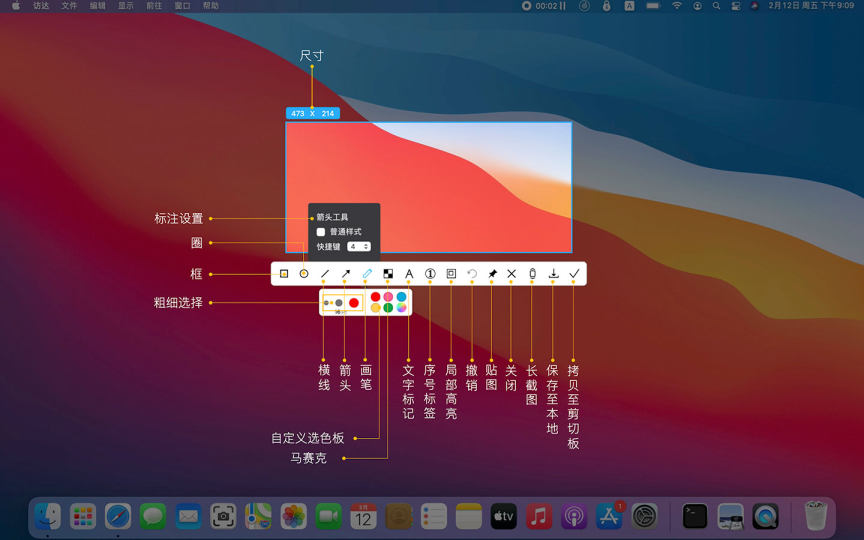
- 标注功能:
矩形、圆形、横线、箭头、画笔、马赛克、文字标记、序号标签、局部高亮; - 快速调整标注尺寸、透明度
标注后,选中标注图案,光标置于标注上,滚动鼠标滚轮或双指在触控板上下滑动,调节透明度;
标注后,选中标注图案,光标置于标注外,滚动鼠标滚轮或双指在触控板上下滑动,调节粗细。 - 丰富的标注样式
箭头、马赛克等标注工具,提供多款样式选择,让你的标注丰富多彩。
六、取色功能
按下截图快捷键时,放大镜将显示当前光标下颜色名称,按下R、G进行RGB、HEX色码拷贝,并支持自定义颜色代码,功能强大。支持原生、普通RGB、SRGB、Adobe RGB、P3多种色域标准
七、录屏功能
- 支持超清、高清、标清多种清晰度、多种FPS的录屏;
- 支持录制系统内部声音;
- 支持录制在线会议
- 支持录制鼠标点按、光标显示;
- 支持视频输出为为mp4、gif格式
- 支持gif输出尺寸比例缩放
八、recording
- 支持录音功能,随时随地录音,商务人士的好帮手。
- 支持录制系统内部声音
九、OCR文字识别
选择截图区域后,点按OCR按钮,进行文字识别,方便好用
OCR功能支持二维码识别,并优先识别二维码
- 支持OCR连续识别模式
- 支持OCR取消换行
十、截图翻译
选择截图区域OCR识别后,进行翻译
Most of the download resources on this site are collected from the Internet,Only for learning and communication purposes,Copyright belongs to the original author。If you need to use non-free software or services,Please purchase genuine licenses and use them legally。If the content published on this site infringes upon your rights,Please contact the webmaster to delete,We will handle it promptly。
If the download address is invalid,You can leave me a message,The editor saw the news,Will update the link as soon as possible! Thanks!


