

softwareintroduce
Adobe Media Encoder 2022 macsoftware是mac os系统上一款强大的音video编码software,可以很容易地将项目导出到任何屏幕上的可播放内容中。media encoder 2022 mac版可以帮助用户减少了大量的时间,提高您的工作efficiency,可让您针对不同应用程序和观众,以各种分发格式对Audio和video文件进行编码。Adobe Media Encoder结合了以上格式所提供的众多设置,还包括专门设计的预设设置,以便导出与特定交付media兼容的文件。借助 Adobe Media Encoder 2022,您可以按适合多种设备的格式导出video,like:DVD播放器、website、手机到便携式media播放器和标清及高清电视,compatibleAdobe Premiere Pro CC、After Effects和其他应用程序。
Media Encoder 2022 for MacsoftwareFunction introduction
Adobe Media Encoder 2022 Mac版可以将video导出到类似YouTube和Vimeo的video共享网站、各种从专业录音底座到DVD播放机的设备、移动电话以及高清电视。Adobe Media Encoder Mac支持收录、转码、创建代理和输出您可以想象的几乎任何格式。使用预设、Watch Folders和Destination Publishing 自动执行工作流程。使用 Time Tuner 无痕调整持续时间,应用LUT和Loudness校正而无需重新打开项目。与 Adobe Premiere Pro、After Effects 和其他应用程序的紧密集成提供了无缝的工作流程。
Adobe Media Encode用作Adobe Premiere Pro、Adobe After Effects、Adobe Audition、Adobe Character Animator和Adobe Prelude的编码引擎。您也可以将Adobe Media Encoder用作独立的编码器。
Adobe Media Encoder版可以轻松编码各种格式的Audio和video。Adobe Media Encoder可用于video的收录、转码、创建代理和输出您可以想象的几乎任何格式。使用预设、Watch Folders和Destination Publishing自动执行工作流程。使用Time Tuner无痕调整持续时间,应用LUT 和 Loudness校正而无需重新打开项目。与 Adobe Premiere Pro、After Effects和其他应用程序的紧密集成提供了无缝的工作流程。
Media Encoder 2022 for Mac features
应用到编码的源设置
自动使编码设置与Adobe Premiere Pro源序列或Adobe After Effects排版相匹配,从而简化您的编码工作流程
拖放编码
WillAdobe Premiere Pro的序列和After Effects的排版直接拖放至 Adobe Media Encoder中,然后立即进行编码。
简便的监视文件夹工作流程
set upAdobe Media Encoder中文版以监视文件夹。自动将存入文件夹的文件编码为您指定的格式。设置监视文件夹,编码成多种格式。
元数据输出模板
保存编码输出中的元数据以提高制作efficiency和增强实用性,或在分发前清除元数据以保护制作数据的机密性。
解释素材选项
对您导入到Adobe Media Encoder的项目的帧率、像素宽高比、场序或alpha通道设置进行自动解释覆盖。
预设浏览器
使用“预设浏览器”即可立即使用常用的设置。按类别整理预设内容并自定义您最常用的编码预设
快速安全地输出到任意屏幕
快速轻松地将您的作品输出成任何video或设备格式。在预设浏览器中自定义、设置和整理您收藏的预设内容,以便快速地导出并在后台进行批量编码
性能和稳定性
使用Watch Folders可将video从单一来源快速编码为多种输出格式。
ARRIRAW,RED EPIC和RED Scarlet-X支持
将ARRIRAW,5K REDEPIC®和RED Scarlet-X素材直接导入Adobe Media Encoder CS6,以便转码为HD和SD格式。
Adobe Media Encoder 2022 的新功能:
支持Sony VENICE 2摄像机
Adobe Media Encoder现在支持Sony VENICE 2摄像机文件格式。
采用Intel和NVIDIA显卡的Window系统上的 10位420 HDR HEVC硬件编码
在使用Intel或 NVIDIA GPU的Windows系统上,10位420 HDR素材的导出速度提高了10倍,这要归功于Premiere Pro中的新硬件编码。
Apple M1 Pro/Max 上的 ProRes 硬件加速
得益于新的硬件加速,M1 Pro 和 M1 Max MacBook Pro的4k及8K ProRes速度现在提高了5倍。导出只需几分之一的时间即可完成。
Apple M1 系统上高resolution HEVC 的硬件加速
在 M1 上的 macOS 12 环境中运行时,Media Encoder可以更快地导出高resolution HEVC。现在支持为 DCI 4K和8K HEVC导出使用硬件编码,性能显著提高。
以前,硬件编码在 M1 系统上可用于最高为 UHD(3840 x 2160 像素)的分辨率。DCI 4K素材为4096 x 2160像素,8K素材为7680 x 4320像素。这些导出改进在所有Apple M1、M1 Pro和 M1 Max系统上的macOS 12环境中都可实现。
统一版本号
在此版本中,Adobe视频和Audio应用程序都将使用版本号 22.0。主要版本提供了Adobe应用程序间的向前和向后互操作性(用于动态链接等功能),以便使用任何 22.x版本的用户都可以使用其他 22.x 版。一致的版本号将会简化更新和协作。
适用于H.264和HEVC的色彩管理
适用于H.264和HEVC格式的全新色彩管理,Adobe Media Encoder会在导入这些格式包括(10位和HDR文件)时解释正确的色彩空间。对于导出,Media Encoder会在输出文件中包含正确的色彩空间元数据,从而确保色彩能够在目标平台上正确显示。
适用于 Sony XAVC-L-HDR 的色彩管理
对Sony XAVC-L-HDR 的全新支持为广播公司和制作团队处理HDR内容提供了另一种选择,占用的服务器和存储空间比XAVC Intra更少。
After Effects合成的渲染速度更快
您现在可以基于硬件和合成将After Effects合成的导出速度提高3倍。
安装Adobe Media Encoder 2022详细步骤
1.Download ready installation package
➡️ Installation package download:先把 Adobe Media Encoder 2022 Download the software ZIP package to your Mac,Usually found in the "Downloads" folder。
➡️ Make sure the file is not damaged,The sizes are almost right (don’t let the lower half break)。
➡️ Unzip the ZIP compressed file to obtain the DMG installation file and other related files,If you don’t have decompression software on your MAC computer,You can install this Czech 1.6.1 Useful decompression tool (Simple and powerful decompression tool) Decompression software,relatively easy to use,Commonly used compression formats are supported。
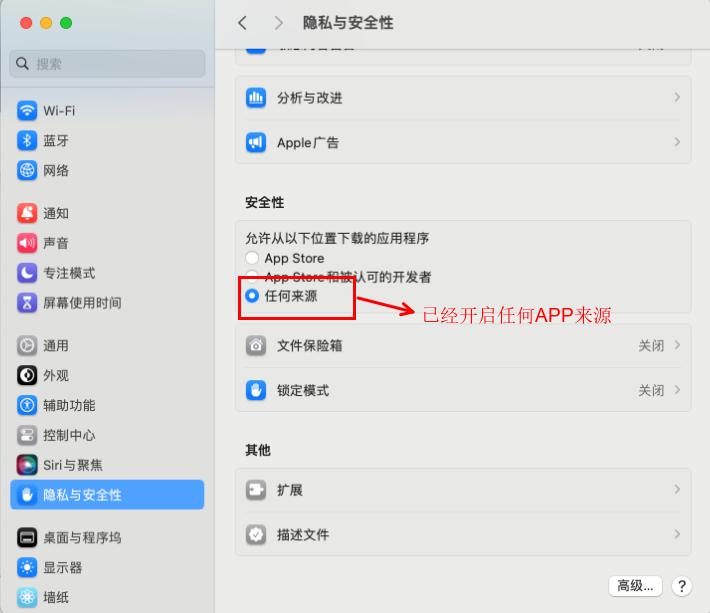
2.Enable software installation that allows [all sources]
➡️ Find the terminal in the MAC launcher and open it,Enter in the terminal:sudo spctl --master-disable,Enter to run,We will be asked to enter our password,Just enter the power-on password directly.,It will not be displayed when typing.,Leave it alone,After typing, press Enter,If there is no prompt,It means the operation is successful.。
➡️ Now we open the settings,In the general tab of Security and Privacy, you can see an additional option of "Any Source",and has locked the selection。这样我们就做好了苹果版Adobe Media Encoder 2022 Preparatory work for software installation。
3.Start installing the AntiCC program
➡️ Double-click to open the AntiCC.dmg file,Find the AntiCC.dmg file in the ZIP archive,double click on it,A window will pop up,In the pop-up window we will see an AntiCC.pkg file,Double click this file,Start installation,Then click Continue in the window that appears,Then click the Install button in the next window,Enter the power-on password in the pop-up window,Then click the Install Software button,Wait for installation to complete,Click the Close button,The Anticc program is installed。
4.开始安装Adobe Media Encoder 2022软件
➡️ In the ZIP archive we will see a folder named Installation Files,Double click to open this folder,Then we will find that there is an install file in the opened directory,at this step,Be especially careful not to double-click this install,Just remember not to double-click it! ! ! We right-click to install,Select Show package contents in the pop-up window menu,Go inside the installation file。As shown below:
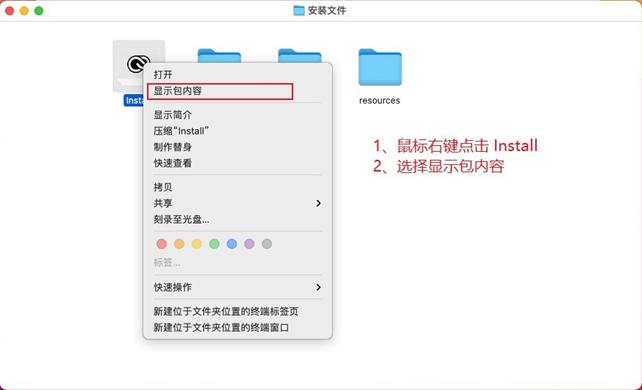
Open the Contents folder。Then enter the MacOS folder,Then double-click the install file to run,就可以开始安装Adobe Media Encoder 2022了。System prompts come from network downloads,Ask if you are sure to open it,Let's click open。This step is similar to installing an APP from an unknown source on your mobile phone.。will ask us to allow this operation,After entering the password,Click OK。wait a moment,就会出现MAC版 Adobe Media Encoder 2022 Software installation interface,Let's just click continue。
➡️ Wait for installation to complete,Wait a little longer,Installation completed,Click the Close button,Installation completed。
5.注册激活 Adobe Media Encoder 2022
➡️ Return to the previous ZIP compressed package,This will be used to activate the .pkg file.,Double-click to activate the .pkg file,Click the Continue button,Click the Install button in the pop-up window,Then enter the power-on password,Click the Install Software button,Installation successful,Click Close,我们的 Adobe Media Encoder 2022软件就激活完成了。
➡️ 现在我们启动Adobe Media Encoder 2022,It can be used normally。
Most of the download resources on this site are collected from the Internet,Only for learning and communication purposes,Copyright belongs to the original author。If you need to use non-free software or services,Please purchase genuine licenses and use them legally。If the content published on this site infringes upon your rights,Please contact the webmaster to delete,We will handle it promptly。
If the download address is invalid,You can leave me a message,The editor saw the news,Will update the link as soon as possible! Thanks!


