
One Switch is a tool for quickly turning on or off system functions on the mac platform.。For example, hide mac desktop icons with one click、Switch to mac’s dark appearance (dark mode) with one click、Turn off Mac hibernation with one click、Turn on mac screen saver with one click、Connect to AirPods and more with one click、Show hidden files on mac with one click、Turn on Mac original color display and other functions with one click,You can also customize other features!
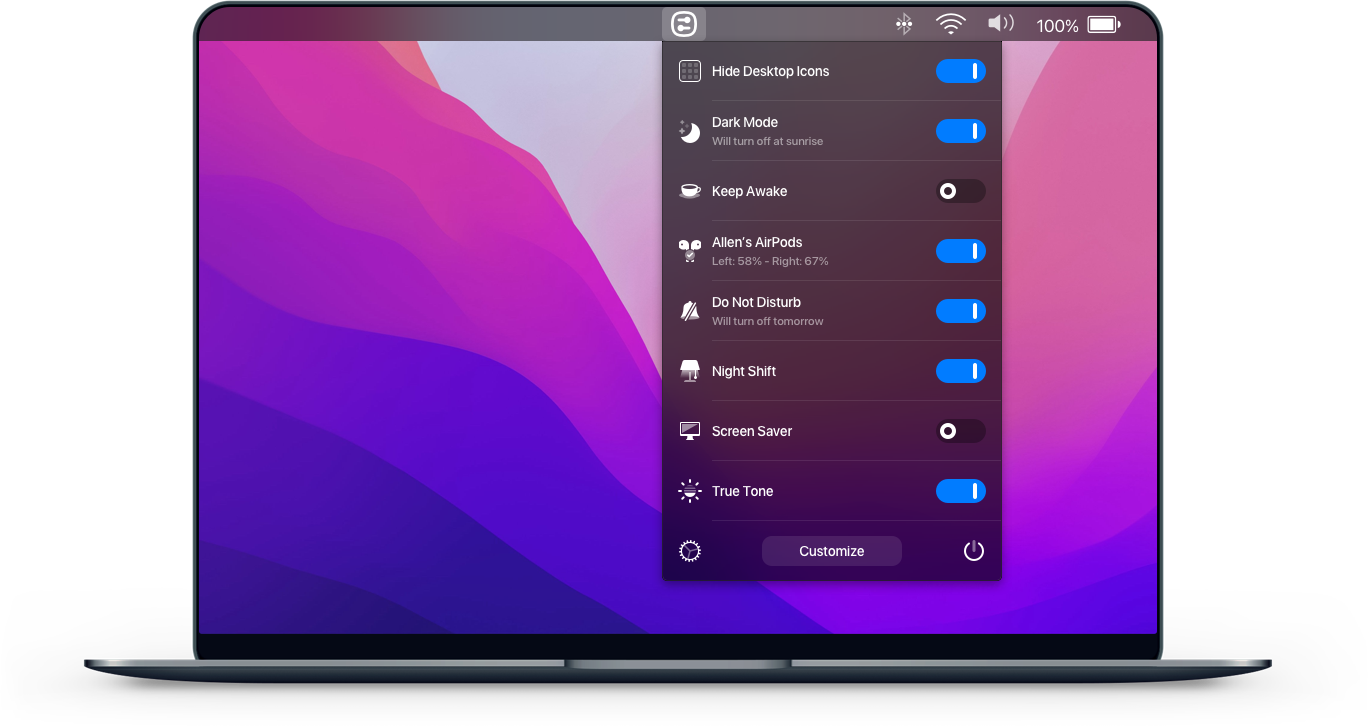
Hide desktop icons with one click
Hide all icons on your desktop with just one click。
Switch to dark mode with one click
Switch between dark/light appearance at any time。
Stay awake with one click
Prevent your Mac from sleeping or showing a screensaver。
Turn on screen saver with one click
Sometimes you may want to turn it on。
Connect AirPods with one click
It only takes a second to connect AirPods to your Mac。
statement:All articles on this site,If there is no special instructions or markings,All are originally published by this site。any person or organization,Without the consent of this website,Reproduction prohibited、Misappropriate、collection、Publish content from this site to any website、Books and other media platforms。If the content on this site infringes upon the legitimate rights and interests of the original author,You can contact us for processing。
Can free downloads or VIP membership resources be used directly for commercial use?
The copyright of all resources on this site belongs to the original author,The resources provided here are for reference and study purposes only.,Please do not use it directly for commercial use。If copyright disputes arise due to commercial use,All responsibility lies with the user。For more instructions, please refer to VIP introduction。
It prompts that the download is complete but cannot be decompressed or opened?
The most common situation is an incomplete download: You can compare the capacity of the downloaded compressed package with the capacity on the network disk,If it is less than the capacity prompted by the network disk, this is the reason。This is a browser download bug,It is recommended to download using Baidu Netdisk software or Thunder。 If this situation is excluded,You can leave a message at the bottom of the corresponding resource,or contact us。
Can't find the sample image in the material resource introduction article?
For members only、Whole site source code、Program plug-in、website template、Web page templates and other types of materials,The pictures used for introduction in the article are usually not included in the corresponding downloadable material package.。These related commercial images need to be purchased separately,And this site is not responsible for(There is no way)find source。 The same is true for some font files,However, some materials will have a list of font download links in the material package.。
The download address cannot be displayed or the content cannot be viewed after payment?
If you have successfully paid but the website does not pop up a success prompt,Please contact the webmaster to provide payment information for you to process
After purchasing this resource,Can I get a refund?
Source code materials are virtual goods,replicable,Transmissibility,once granted,No refunds of any kind will be accepted、Exchange request。Please confirm before purchasing to obtain the resources you need.
Comments (0)
Note: Please be respectful and civil in your comments Cancel reply
Beyond Compare is an old comparison tool,Provides rich comparison functions。It can be used to compare various types of files and folders,Include plain text files、Rich text document、compressed file、FTP sites and more。It helps users compare file differences、Keep folders in sync、File merge、Analyze differences in multimedia files,Even visually compare registry files。The main goal of Beyond Compare is to help users analyze differences in detail,and conduct detailed processing。The software already contains many default preset templates,User-friendly。Save on rewrite costs with Beyond Compare,Improve work efficiency,and reduce the likelihood of errors occurring。
EndNote 21 is hailed as the world's best reference manager,It is designed to help users save time、Stay organized and collaborate with colleagues,ultimately achieve the goal of publishing research results。 This means you can focus more on what matters most:your ideas。 EndNote 21 makes organizing、Managing and citing diverse academic literature becomes a breeze,Whether it's a book、Journal articles or online resources。 Its powerful search function allows you to quickly find the information you need among millions of research resources,And can be seamlessly integrated with a variety of word processing software,Simplifies the process of citing and generating bibliographies when writing a paper or report,Greatly improve writing efficiency。 EndNote 21 is not just for researchers、engineer、Strong support from inventors and cataloging experts,Tag management is also introduced、Data recovery and other new features,and improved writing processes with Google Docs tools。 New EndNote web interface and support for Google Docs,Enables users to access research materials anytime, anywhere,Improved ease of research and collaboration。
Dynamic Wallpaper Engine(Live wallpaper engine)It is a dynamic wallpaper tool carefully built for Mac users.,Let users say goodbye to the single static wallpaper of the past,Experience vibrant live wallpapers。This program provides ready-made video materials for users to choose from,It also supports importing local videos。The most convenient thing is that users can set the selected video as desktop wallpaper,You can also freely set it as a screen saver for your computer,Make your desktop come alive、interesting。 feature: 2000+Exquisite video material,Continuous updates,You don’t have to spend time finding material。 Video material classification:4K ultra clear、cartoon animation、natural humanities、Cute pets、game world、creative video、Pleasant beauty、antique style、Movie stars, etc.,There is always a style that suits you。 Support "keyword search",Search for your favorite live wallpaper。 Support "add playlist",single cycle、List loop、Shuffle mode。 Support scheduled switching,Automatically switch live wallpaper every half hour/hour/daily。 Support dynamic screensaver,Personalized lock screen,Full of style。 Support "break reminder",Custom reminder time,Avoid eye and brain fatigue。 Import local videos with one click,Convenient and fast。 Supports multiple screen aspect ratios and native resolutions,Support fish screen。 Support multiple monitors,Different dynamic wallpapers for different monitors。 Turn on smart control,Automatically pause when using other apps,Work without being disturbed。 Automatically pause when power is not connected,Save power。 Support hiding desktop icons,Immersive experience。 Support "global shortcut keys",Switch wallpapers with one click、Hide desktop icons、display saver。 one time purchase,Valid permanently,There are no charging points in the software。 Zero App learning cost,Simple interaction,Pursue the best experience。 Dynamic Wallpaper is designed to provide a fun experience,while occupying as little system resources as possible。
Comments (0)

