

Money Pro is a very useful financial management software on Mac,More than two million customers around the world currently use it to manage their personal finances。It's a true all-in-one app,Can plan bills for you、Arrange budget、Track transactions,And all operations can be performed synchronously。
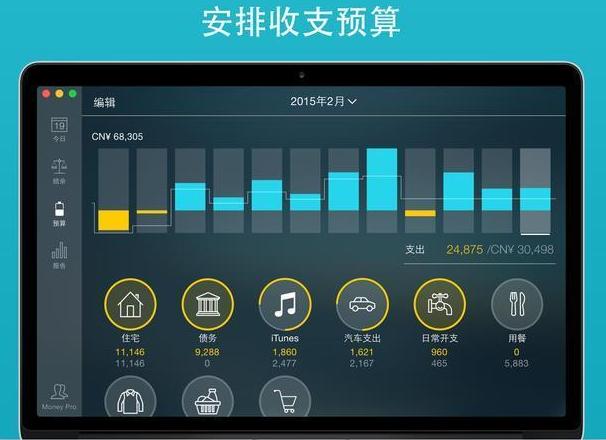
Money Pro offers a one-stop bill plan、Budget management and account tracking。 This app features easy sync。 Money Pro is ideal for home budgeting and even business applications。
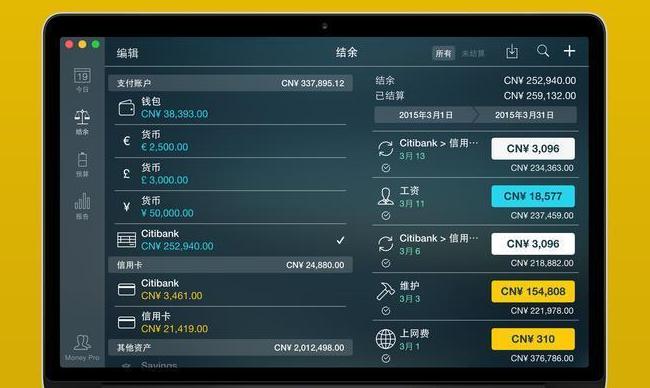
Function
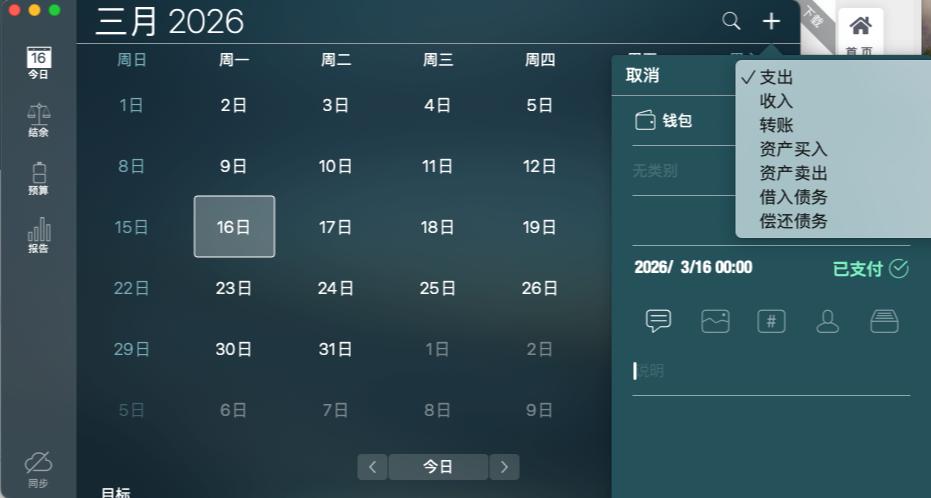
calendar
- 在大日历中标出账单到期的日子。
- Set up recurring bills with customizable periods。
- Filter transactions by selecting a date in the calendar。
今日视图
- 快速查看到期账单。
- Quickly approve transactions as they occur。
- Money Pro can predict transactions that have not been manually scheduled for the day。
账单到期通知
- 全面的提醒系统可以提醒您即将到期的账单。
- Quick rescheduling options can help you deal with (tomorrow、3 Within the day、Bills due next week)。
预算
- 为收入和支出创建预算条目,and specify budget limits for each item。
- You can set different budget limits for each time period。If you plan to reduce your expenses month by month,This feature is very useful。
- Start adding each of your transactions,See the growth of each category and overall growth。
- 用于监控预算超支的直观指示器
- 选择要分析的类别并即时查看所生成的预算趋势图
预算转结
- 您可以设置将当前时间段内的预算结余转结至下一预算时间段。
- If you overspent in a previous time period,Budget rollover automatically limits your spending。
支票明细账
- 您可以同时设立不限数量的账户(支票、savings、credit card, etc.)。
- Make a transaction recurring or one-time。
- 结余变化历史
- 用于管理记录的额外字段,include payee、illustrate、Check number、Classification (Personal Expenses/Business Travel Expenses)。
- 收据照片附件
账户对账
- 您可以记录交易,并在日后结清(对账)。
- 自动计算可用余额和结清余额。
导入银行对账单
- 导入交易历史,使您的账户时刻保持最新状态(支持文件:.ofx)。
- Money Pro 能够了解您如何对交易进行分类,并能够预测要导入的交易属于哪个类别。
拆分交易
- 您可以将交易拆分成多个类别。当您在大型商场购物并同时支付多个产品时,This feature is very useful。
计算器和货币换算器
- 计划预算时计算金额
- 进行交易输入时可快速换算货币
搜索
- 可以按金额、类别、说明和收款人等搜索交易。
详细报告
- 收入/开支
- 现金流
- 交易
- 资产/债务(净值)
- 预计结余
- 日/周/月/年趋势图
许多自定义选项
- 制定预算和账单计划时可自定义周期(每周、每两周、每月等)
- 可根据需要调整收入/支出类别和子类别的结构。
- 利用 1400 多个内置图标来自定义账户和类别。
- 使用照片来创建您自己独一无二的图标。
iCloud
- Money Pro 使用 iCloud 在您的所有设备之间同步数据 (iPhone、iPad、Mac)。
Back up data
- Money Pro 可在所有关键时刻自动备份您的数据。
- 您也可以手动创建备份。
多个描述文件
- 您可以设置多个描述文件,来分别跟踪自己的家庭预算和小型业务。
更多
- 打印并可导出为 pdf、qif、csv 格式
- 密码保护
- 支持多种货币并自动更新汇率
- 从 csv 导入数据
安装Money Pro 2.11.23详细说明
1.Download ready installation package
➡️ Installation package download:先把 Money_Pro_2.11.23_MAS.dmg 文件下载到你的 Mac 上,Usually found in the "Downloads" folder。
➡️ Make sure the file is not damaged,The sizes are almost right (don’t let the lower half break)。
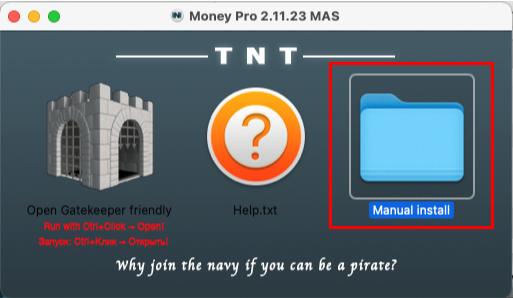
➡️ Double-click to open the DMG file above,The following window appears,Click the Manual button to enter the Manual install folder,里面有Money Pro 2.11.23 BUT[TNT].dmg file。
2.Start installation
➡️ Double-click to open the .dmg file,找到你的 Money Pro 2.11.23 BUT[TNT].DMG file,double click on it,A window will pop up,里面通常有 Money Pro 的图标和一个“Applications”(应用程序)的文件夹图标。
➡️ 把 Money Pro 图标拖到 Applications 里,把左边的 Money Pro 图标(或者其他显示 Money Pro 的图标),Use mouse directlyDrag and drop to the “Applications” folder icon on the right,Just like putting a file into a folder。👉 This step is equivalent to installing the software into your computer。
(If a pop-up prompt says "Unable to verify developer",Don't panic,Continue reading below)
➡️ Handling "Cannot verify developer" prompt (common situation)macOS may pop up a window saying that this app is not from the App Store,not safe,Asking if you want to open it。You can do this:
FirstHold down the Control key,然后点击那个 Money Pro 图标,Select"Open";
Or go[System Settings]→[Privacy and Security]→[Security]There,You will see a prompt saying that an app is blocked,Click"Still open" That’s OK。
➡️ Wait for copy to complete,After dragging it over,The system will automatically copy the software to your application folder,Just wait until the progress bar runs out or the prompt is complete.。
3.Money Pro无须激活,Use it directly after installation。
Most of the download resources on this site are collected from the Internet,Only for learning and communication purposes,Copyright belongs to the original author。If you need to use non-free software or services,Please purchase genuine licenses and use them legally。If the content published on this site infringes upon your rights,Please contact the webmaster to delete,We will handle it promptly。
If the download address is invalid,You can leave me a message,The editor saw the news,Will update the link as soon as possible! Thanks!


