

Axure RP is the flagship product of the American Axure Software Solution company,Is a professional rapid prototyping tool,Let's take responsibility for defining requirements and specifications、Experts in designing functionality and interfaces can quickly create wireframes of applications or web sites、flow chart、Prototype and specification documentation。
As a dedicated prototyping tool,It is better than general tools for creating static prototypes such as Visio、Omnigraffle、Illustrator、Photoshop、Dreamweaver、Visual Studio、FireWorks needs to be fast、Efficient。
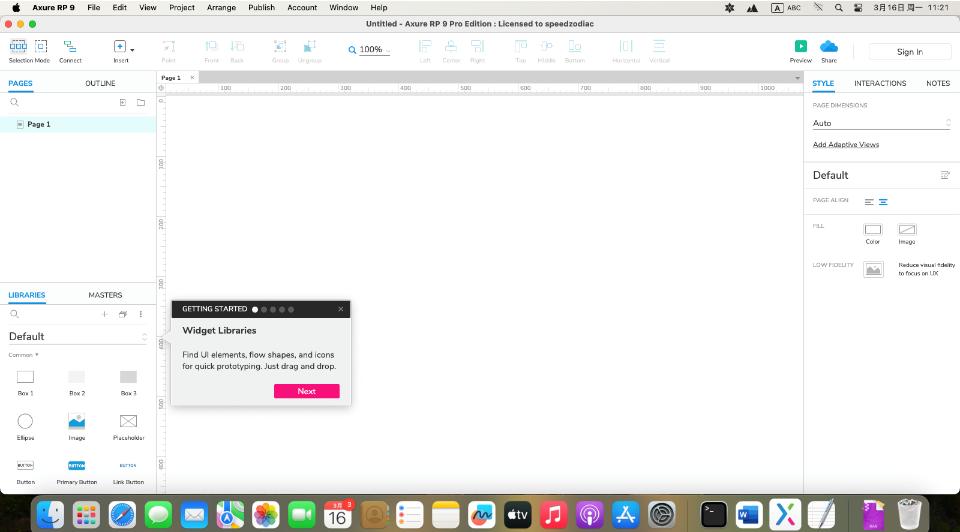
Axure RP can help website designers,Quickly and easily create annotated page diagrams based on website architecture diagrams、Operation flow chart、and interaction design,And can automatically generate web page files and specification files for demonstration,to provide demonstration and development。
Axure RP Pro features include sitemaps、process design、Page frame design、Simple interaction design, etc.,Can generate HTML、Word and other formats。
RP operation is much simpler than using Dreamweaver,picture、character、All components such as input boxes are all visual operations,It can easily realize the prototype design of website interactive content.,All previously rigid page layouts can be replaced with clickable、Link effect web page!At the same time, it can provide AJAX-style interactive processing for website design.,RP provides a dynamic layer component,Set effects for different states on the same page,Then use the link、Buttons and other triggers can produce dynamic effects,This way the website design becomes more vivid,The intention is more intuitive。
Detailed instructions for installing Axure RP
1.Download ready installation package
➡️ Installation package download:First put Axure RP 9.0.0.3727 Download the software RAR archive to your Mac,Usually found in the "Downloads" folder。
➡️ Make sure the file is not damaged,The sizes are almost right (don’t let the lower half break)。
➡️ Decompress the RAR compressed file to obtain the DMG installation file and registration code information file,If you don’t have decompression software on your MAC computer,You can install this KeKa 1.4.3 Chinese cracked version(Simple and powerful decompression tool) Decompression software,relatively easy to use,Commonly used compression formats are supported。
2.Start installation
➡️ Double-click to open the .dmg file,Find your Axure RP-Setup.DMG file,double click on it,A window will pop up,Usually has Axure RP inside 9 icon and an Applications folder icon。
➡️ Put Axure RP 9 Drag the icon into Applications,Put the Axure RP on the left 9 icon (or other display Axure RP 9 icon),Use mouse directlyDrag and drop to the “Applications” folder icon on the right,Just like putting a file into a folder。👉 This step is equivalent to installing the software into your computer。
(If a pop-up prompt says "Unable to verify developer",Don't panic,Continue reading below)
➡️ Handling "Cannot verify developer" prompt (common situation)macOS may pop up a window saying that this app is not from the App Store,not safe,Asking if you want to open it。You can do this:
FirstHold down the Control key,Then click on that Axure RP 9 icon,Select"Open";
Or go[System Settings]→[Privacy and Security]→[Security]There,You will see a prompt saying that an app is blocked,Click"Still open" That’s OK。
➡️ Wait for copy to complete,After dragging it over,The system will automatically copy the software to your application folder,Just wait until the progress bar runs out or the prompt is complete.。
3.Register to activate Axure RP 9
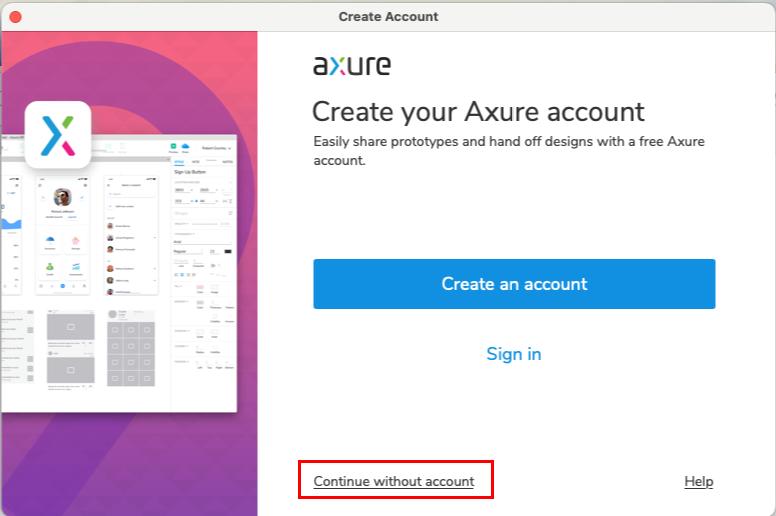
➡️ Use little snitch or Hands Off! Prevent Axure RP 9 from connecting to the Internet,Or just turn off the WIFI connection of your MAC computer。Click continue without account in the create account window that pops up in Axure RP 9 ,As shown below:
➡️Open README.txt,Select a set of serial numbers。
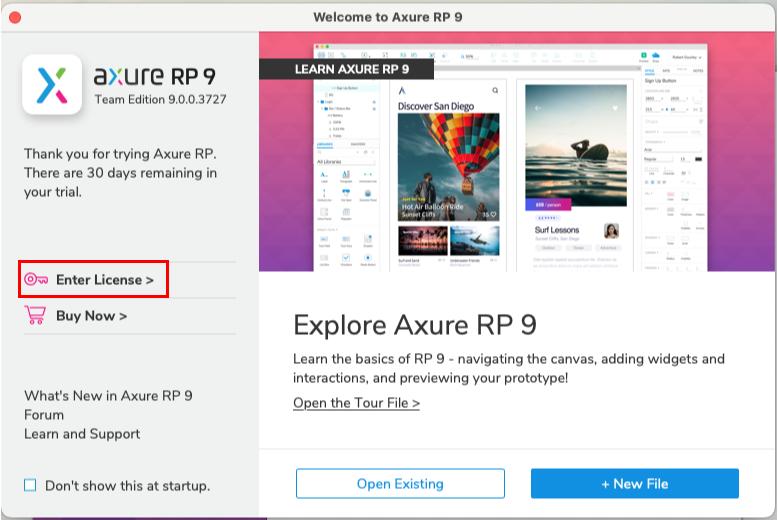
➡️ Click Enter License,Type the serial number,Click OK。As shown in the picture:
Most of the download resources on this site are collected from the Internet,Only for learning and communication purposes,Copyright belongs to the original author。If you need to use non-free software or services,Please purchase genuine licenses and use them legally。If the content published on this site infringes upon your rights,Please contact the webmaster to delete,We will handle it promptly。
If the download address is invalid,You can leave me a message,The editor saw the news,Will update the link as soon as possible! Thanks!


