

Adobe Photoshop 2020 is Adobe in 2019 Important releases at the end of the year,Marks Photoshop’s official farewell to the “CC” naming system,Comprehensive shift to modern workflows based on artificial intelligence (AI) and cloud services。This version is available in image selector、Editing efficiency、Cross-platform collaboration and user interface have been significantly improved.。
one、AI-driven intelligent image processing
- One-click subject selection (Subject Selection)
Automatically identify and select people in photos through AI、animal or subject,Supports fine edges (such as hair),Complete cutout with one click 。 - Content-aware fill enhancements
- Different areas can be filled multiple times in the Content-Aware Fill workspace,No need to open tools again 。
- Support sampling pixels from all visible layers,Improve filling naturalness 。
- Automatic coloring and repair
- Automatically colorize old black and white photos,Powered by Adobe Sensei AI 。
- Delete unwanted objects (such as wires) with one click、pedestrian),And intelligently fill the background 。
- skin smoothing
Provides AI-driven beauty features,Automatically recognizes faces and smoothes skin,Support slider to adjust intensity 。
two、Selection and Mask Tool Optimization
- Object Selection Tool
Added to Quick Selection and Magic Wand tool groups,Available in "Rectangle" and "Lasso" modes,Automatically select complex objects 。 - Selecting and masking workspace performance improvements
Move Edge and Smooth controls are more responsive with high-resolution images 。 - Portrait selection optimization
The Select Subject command is optimized for portraits,Capture hair more accurately、Eyelashes and other details 。
three、Workflow and efficiency improvements
- Ruler Tool improvements
Line thickness can be controlled with Stroke options,Instead of the old Width setting 。 - Actual size view (View > Actual Pixels)
Automatically calculate scaling based on monitor hardware information,Make sure the screen displays true size (e.g. 7 An inch-wide image appears as 7 inch。 - Layer overlay and new button optimization
The new layer button uses the "+" icon,More intuitive;Layer overlays make it easy to quickly create composite effects 。 - Property panel integration
Text attributes integrate functions such as "Character", "Paragraph" and "Conversion",Reduce panel switching 。
Four、Camera Raw and color management enhancements
- Camera Raw improvements
- Supports opening multiple editing panels at the same time 。
- Added "Hue" slider in the "Local Adjustments" panel,Color can be adjusted locally 。
- Improvements to the Curves panel,Supports quick switching between parametric curves and point curves。
- Gradient and color palette grouping
Preset library by gradient、pattern、style、Swatches、Shape classification,Find more easily 。 - rotatable pattern
pattern fill、Stroke、Superposition, etc. support rotation at any angle,and is a non-destructive operation 。
five、Cross-platform and cloud integration
- Cloud document function
Supports saving files to Adobe Cloud,Implement Windows、Seamless sync between macOS and iPad versions 。 - Automatically activate Adobe fonts
When opening a document,If using missing fonts,Photoshop will automatically sync available Adobe fonts over the Internet 。 - Matching font function upgrade
Borrowing Adobe Sensei,Can identify fonts in images and recommend similar fonts,Supports vertical text and multi-line detection 。
Detailed steps to install Adobe Photoshop 2020
1.Download ready installation package
➡️ Installation package download:First put Adobe photoshop 2020 Download the software ZIP package to your Mac,Usually found in the "Downloads" folder。
➡️ Make sure the file is not damaged,The sizes are almost right (don’t let the lower half break)。
➡️ Unzip the ZIP compressed file to obtain the DMG installation file and other related files,If you don’t have decompression software on your MAC computer,You can install this KeKa 1.4.3 Chinese cracked version(Simple and powerful decompression tool) Decompression software,relatively easy to use,Commonly used compression formats are supported。
2.Enable software installation that allows [all sources]
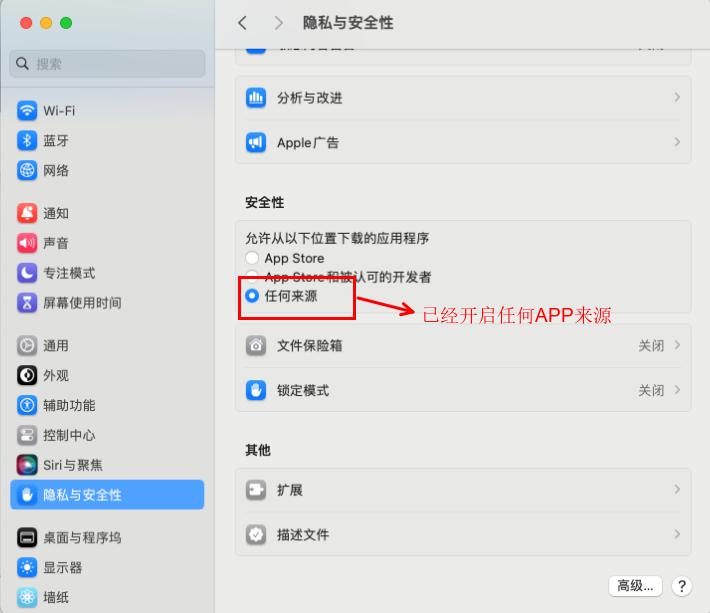
➡️ Find the terminal in the MAC launcher and open it,Enter in the terminal:sudo spctl --master-disable,Enter to run,We will be asked to enter our password,Just enter the power-on password directly.,It will not be displayed when typing.,Leave it alone,After typing, press Enter,If there is no prompt,It means the operation is successful.。
➡️ Now we open the settings,In the general tab of Security and Privacy, you can see an additional option of "Any Source",and has locked the selection。In this way, we have completed the preliminary preparations for the installation of the Apple version of Adobe photoshop software.。
3.Start installing the AntiCC program
➡️ Double-click to open the AntiCC.dmg file,Find the AntiCC.dmg file in the ZIP archive,double click on it,A window will pop up,In the pop-up window we will see an AntiCC.pkg file,Double click this file,Start installation,Then click Continue in the window that appears,Then click the Install button in the next window,Enter the power-on password in the pop-up window,Then click the Install Software button,Wait for installation to complete,Click the Close button,The Anticc program is installed。
4.Start installing Adobe photoshop 2020 software
➡️ In the ZIP archive we will see a folder named Installation Files,Double click to open this folder,Then we will find that there is an install file in the opened directory,at this step,Be especially careful not to double-click this install,Just remember not to double-click it! ! ! We right-click to install,Select Show package contents in the pop-up window menu,Go inside the installation file。As shown below:
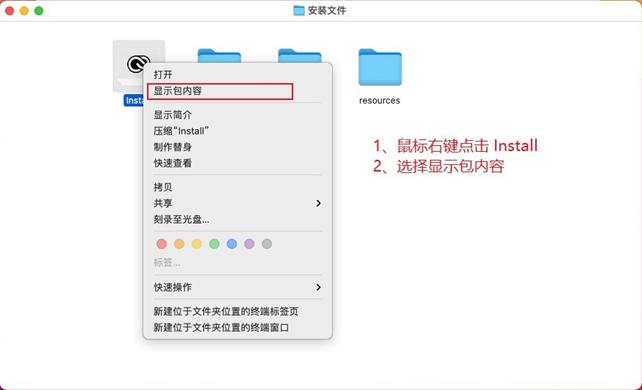
Open the Contents folder。Then enter the MacOS folder,Then double-click the install file to run,You can start installing adobe photoshop。System prompts come from network downloads,Ask if you are sure to open it,Let's click open。This step is similar to installing an APP from an unknown source on your mobile phone.。will ask us to allow this operation,After entering the password,Click OK。wait a moment,The installation interface of the MAC version of Adobe PhotoShop software will appear.,Let's just click continue。
➡️ Wait for installation to complete,Wait a little longer,Installation completed,Click the Close button,Installation completed。
5.Register to activate Adobe photoshop 2020
➡️ Return to the previous ZIP compressed package,This will be used to activate the .pkg file.,Double-click to activate the .pkg file,Click the Continue button,Click the Install button in the pop-up window,Then enter the power-on password,Click the Install Software button,Installation successful,Click Close,Our adobe photoshop software has been activated。
➡️ Now we start Adobe photoshop,It can be used normally。
Most of the download resources on this site are collected from the Internet,Only for learning and communication purposes,Copyright belongs to the original author。If you need to use non-free software or services,Please purchase genuine licenses and use them legally。If the content published on this site infringes upon your rights,Please contact the webmaster to delete,We will handle it promptly。
If the download address is invalid,You can leave me a message,The editor saw the news,Will update the link as soon as possible! Thanks!


