

Some users of Feihu stock software may not receive GEM stock quotes during use.,In this case, you need to make corresponding settings in Feihu’s market management.。The following will explain in detail how to make the corresponding settings.。For user reference。
1、From the menu "Management" → "Market Management" → "Shenzhen Exchange":
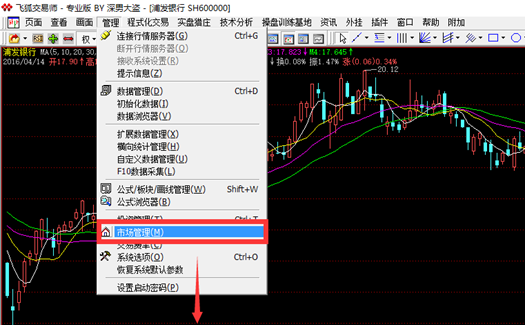
The following pop-up window appears:
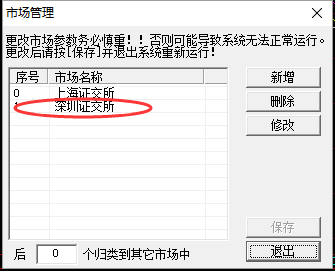
2、Check if there is "300###" in the "Blocking Code",If there is, remove it;
Before deletion:
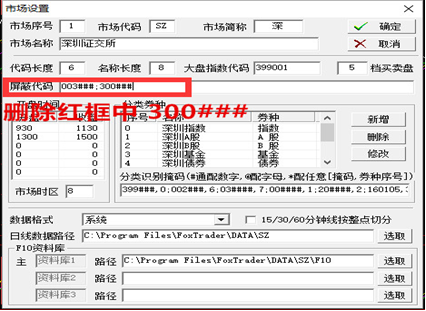
After deletion:
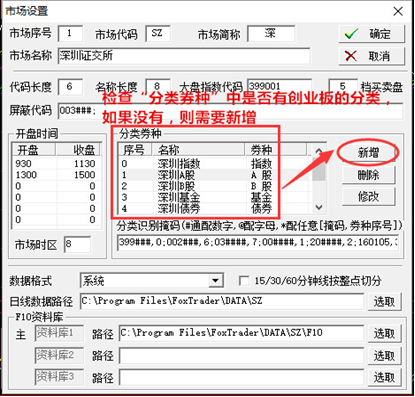
3、Check "Category Voucher Type",See if there is a GEM classification,if not,you need to add,Please refer to Figure 2 for details.
Figure 1:
Figure 2:
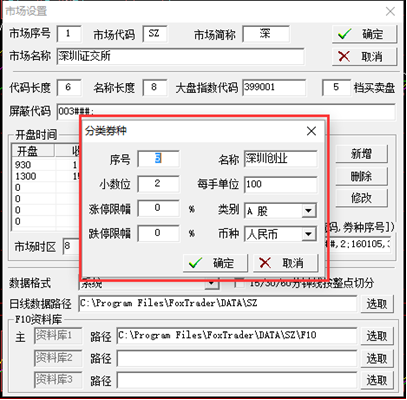
4、Check "Classification Identification Mask",Check to see if there is "30####,5". The 5 behind it corresponds to the serial number in the "Category Coupon Type";
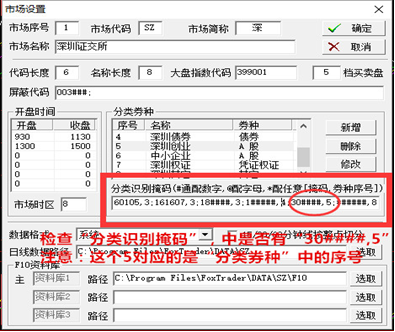
After setting the above three points,,After clicking "OK" and "Save",Exit Feihu and re-enter,Connect to the server to view Shenzhen GEM stock quotes。
My WeChat account
Scan on WeChat

My WeChat account
WeChat ID has been copied
My WeChat public account
Scan on WeChat

My official account
Official account has been copied
